AutomateQAandmonitoringacrossSmartTVs,mobileapps,andSTBcombiningagenticAIandalgorithmicvalidationonreal-devices.
Agentic SDK - One platform, three automation modes
Ad hoc AI testing. Continuous hybrid workflows. Fully customizable automation.
Each mode is optimized for a specific operational objective:
from rapid AI-driven validation to continuous monitoring and fully engineered automation workflows.


Choose your automation:
All your collected data in one
observability platform: Smartgate
Four levels of analysis
Gain insights at every level, from high-level overviews to in-depth scenario details:
- Global overview – Track the status of your latest test campaigns.
- Data analysis & comparison – Identify trends and benchmark performance.
- Detailed test runs – Review runs history with a built-in feedback loop.
- Scenario-level insights – Access KPIs, video recordings, and in-depth reports for one specific test run.

Automated reports delivered to your inbox
With Smartgate’s email reporting engine, easily share interactive dashboards and detailed, actionable reports with your teams.

Quick access to scenarios and KPIs
directly from the REC
Access scenario information
The Manage Scenarios panel in the Remote Eye Controller (REC) gives you visibility into the test activity.
Instantly see which scenarios are currently running, which were previously executed, and which are scheduled next.
Quickly trigger a new test or launch a different scenario right from the panel.

Spot issues instantly with real-time visual alerts
With Witbe’s bold red overlay in the Remote Eye Controller (REC) mosaic, critical issues stand out the moment they happen.
Whether it’s a failed channel, VoD asset, or QA test, the affected tile is instantly flagged, so your team knows exactly where to act.
Combined with live KPIs and video streams, this visual alert system speeds up incident detection and simplifies triage, even across the most complex monitoring setups.

See KPIs directly in the REC!
Click on any scenario to view its live test results and KPIs as they populate in real time.
Need to verify a fix? Instantly trigger a new test to check whether an issue persists or has been resolved.
A direct shortcut to Smartgate lets you dive deeper into results for faster analysis and resolution.

Use cases powered by automation
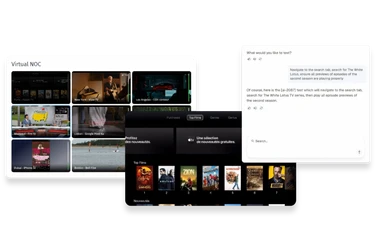
Agentic SDK powered QA test automation
Boost your QA through automation with endurance, stress and performance testing.
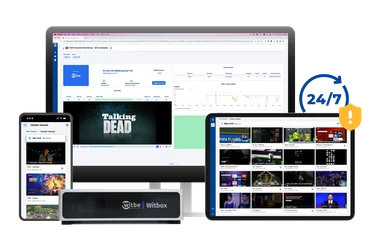
AI-powered video service monitoring
Continuous tracking of video delivery to ensure quality, performance, and reliability.
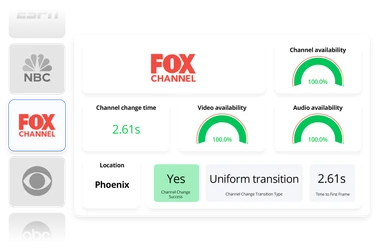
Live TV monitoring
24/7 real-time tuning, content availability, and stream quality across live TV lineups.
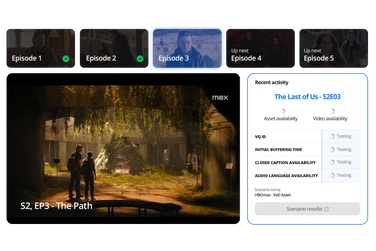
VoD asset checking
Automatically verify availability and playback of all your VoD assets.
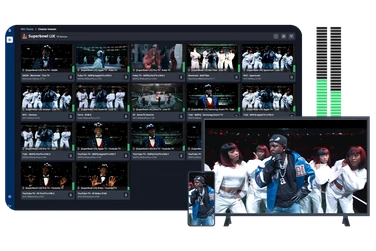
Special live event monitoring
Monitor the performance, quality and integrity of your stream when the world is watching.
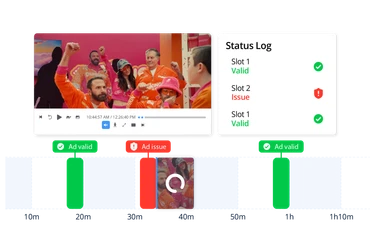
Ad monitoring and matching
Ensure every ad, from pods to on-field placements to branded frames, is delivered, visible, and monetizable
Frequently asked questions
Can the platform support testing across different operating systems and firmware versions?
Witbe’s technology works on real, unmodified devices, so it naturally supports all OS versions and firmware updates. You test exactly what your users experience.
Does test automation work with DRM-protected content?
Because tests are performed on real consumer devices, even DRM-protected content is tested end-to-end, just like a viewer would experience it. There’s no workaround or proxy, just authentic playback monitoring.
Can I automate tests across Smart TVs, mobile apps, and set-top boxes?
Yes, absolutely. Witbe enables testing on any device that plays video, whether it’s a Smart TV, mobile phone, set-top box, or even a game console.
Can I simulate real user behavior like signing in, navigating menus, or switching channels?
Yes, Witbe robots replicate user actions with precision, from entering credentials to browsing menus, starting playback, or switching channels. These interactions are automated and repeatable across devices.
How much coding is required to create or modify tests?
None is required. Witbe supports both no-code and full-code automation.
With AI-driven testing and prebuilt hybrid scenarios, teams can create and run tests without writing code.
For advanced use cases, the Agentic SDK provides a full Python-based environment to customize, extend, or build entirely new workflows. This flexibility allows teams to choose the level of control that fits their operational needs.
Can automation detect and report video quality issues like buffering, black screens, or ad mismatches?
Witbe’s automation monitors every step of the video journey and flags issues in real time, whether it’s a black screen, a buffering delay, a mismatched ad, or UI failure. You get actionable data instantly thanks to our algorithm MOS VQ id Analysis
Can test automation be integrated into CI/CD pipelines?
Yes. Witbe’s platform can trigger tests via APIs and integrate seamlessly into your CI/CD workflows.
Can it scale across multiple regions and thousands of devices?
Witbe’s architecture is designed for global operations. You can deploy and manage thousands of devices across offices, test labs, or customer regions, all from a centralized dashboard.
Can I build custom test cases or use prebuilt templates?
You can do both. With Witbe Agentic AI, design test plans based on natural language goal based prompts. Witbe also provides a library of ready-to-run tests and allows you to design fully customized scenarios, giving you full control over your testing and monitoring strategy.