Remote device control
Operate and test real devices remotely: anytime, anywhere.
How it works in 3 steps

Access all your testing devices in one place
View, organize, and manage every connected test device from a single web interface.
- Group devices by location, project, service, robot or device type.
- Create clusters permanently for ongoing monitoring or on-the-fly for temporary testing.
- Monitor hundreds of devices at once in the REC Mosaic.
- Access live video feeds to see exactly what your viewers see.
Centralized visibility for faster, smarter testing workflows.
Because REC runs in any web browser, real video monitoring can move from the NOC wall to any laptop, freeing up screen space without losing visibility.

Take control of your devices remotely
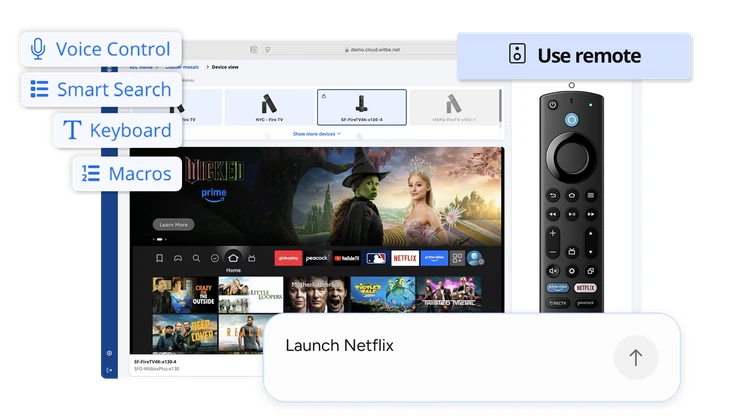
Operate your devices exactly as your viewers would; through your browser:
- Operate devices in plain language with Witbe's AI Assist: describe the action a viewer would take, and the copilot executes it on the real device.
- Use an exact remote representation (including long presses).
- Type out a channel name without having to remember its number.
- Send sequences of remote codes with the macros.
- Type out the content you are looking for and access it faster with Smart Search.
- Say what you need with voice control.
Your teams can replicate real-world usage and spot issues faster, without moving away from their desk.

Control multiple devices at once with cluster control
- Natural-language cluster control
Tell Witbe's AI Assist what to do, once, and watch it execute across every device in the cluster. - Unified Remote Commands
Send the same control codes to all STBs in your cluster at once.
- Synchronized Channel Tuning
Tune every device to the same channel, even if each has a different channel number. - Seamless Integration
Works seamlessly with predefined or on-the-fly clusters.
Collaborative testing for instant resolution

Team collaboration
The REC transforms how teams work together.
With Request Control, teammates can instantly hand off a device or take over testing without interrupting workflows: no messages, no waiting.
Everyone can watch the same live feed, share insights, and stay coordinated across locations.
Features like Picture-in-Picture mode make it easy to keep an eye on a stream while working on something else, and Keep-Alive checks ensure every device stays connected and ready when needed.

Stop arguing, start solving!
When an issue appears, record exactly what the viewer sees and share it instantly.
Video proof replaces guesswork and endless debate, helping teams focus on fixing issues fast.
Whether you’re collaborating with engineering, vendors, or operations, having clear evidence speeds up root-cause analysis and resolution; no matter where your team is - show it, share it, and fix it.
Key advantages
Scale device management
Operate hundreds at once with Witbe's AI Assist in the REC Mosaic, one dashboard.
Cut costs and save time
Eliminate travel, shipping, and on-site testing costs with full remote access.
Get true visibility
Test services exactly as viewers experience them on real networks and devices.
Frequently asked questions
Do I need coding skills to remotely test devices with Witbe?
Not at all. The Remote Eye Controller's (REC) web interface is intuitive and requires no coding or SDKs.
Can multiple users test the same device remotely at once?
Yes. While only one user can control a device at a time, others can view the live feed simultaneously. The “Request Control” feature allows team members to hand over control smoothly without interrupting testing.
How can I remotely control and test mobile apps on real devices?
Witbe enables full mobile app automation on real smartphones and tablets. You can remotely control and test iOS and Android devices, run automated scenarios, and analyze KPIs in Smartgate, just as with other devices.
Can I control multiple devices at once?
Yes, the Remote Eye Controller (REC) Mosaic allows you to view and operate multiple devices simultaneously via Cluster Control.
Can I host Witbox on-premises or in the cloud?
You can deploy Witbox on-premises, in Witbe datacenters, or use a hybrid setup for global coverage.
Can I restart or reset test devices remotely through Witbe REC?
Yes. With the Remote Eye Controller (REC), you can reboot any connected device remotely; whether it’s a Smart TV, set-top box, or mobile device. You can also configure the time length of the custom pause before rebooting Streaming Media Boxes, ensuring a more effective reset.
Does Witbe record the screen or video proof during remote tests?
Yes. Remote Eye Controller (REC) allows you to capture video proof of any issue, making collaboration with vendors or engineers faster and more effective.
How secure is remote device control via the REC?
Witbe’s Remote Eye Controller (REC) uses encrypted connections and access permissions to ensure only authorized users can view or control devices.
Can I automate remote device testing?
Yes. You can schedule simple full AI automated tests with a single natural-language prompt via Witbe's REC, or more advanced hybrid tests via Agentic SDK, and analyze KPIs in Smartgate.
How does remote testing compare to cloud device farms?
Witbe differs by testing on real consumer devices and networks (not emulators) providing accurate Quality of Experience (QoE) data.
Can I monitor and control devices in multiple countries?
Yes. Deploy Witbox globally and access them all through the Remote Eye Controller (REC) interface, no matter where your teams are located.
Can I control my devices using natural language?
Yes. Witbe's AI Assist, embedded in the Remote Eye Controller (REC), lets you launch real actions on STBs, mobiles, Smart TVs, or full clusters using plain language, and schedule the same actions as automated, repeatable tests.